MOTORSPORTSOFTWARE — DRIVER COMPARISON REPORT SYSTEM SOURCES: CSV · VBOX · AiM

Turn Session Data Into Branded Driver Comparison PDF

Generate race-ready driver comparison PDF from real session data without rebuilding reports by hand. MSS Analysis turns compatible CSV files with GPS traces, VBOX files, and AiM data into consistent branded debrief material for engineers, coaches, and teams.

MSS Analysis home screen
FIG. 01 — OPENING SPREAD
Private team login
Reports accounts do not need personal email logins. Teams can run controlled account access for a private reporting workspace.
Windows + Mac apps
The desktop apps support local report generation and local PDF saving on Windows and Apple silicon Mac. Online account, license, cloud processing, PDF storage, and support workflows are separate online features.
CSV, VBOX, AiM
The CSV workflow is not locked to a fixed vehicle list when GPS traces and required channels are present. VBOX and AiM are supported source paths.
Custom PDF
Report branding, page order, labels, and analysis sections can be adapted for teams, coaches, and series-specific workflows.
SECTION ATHE REPORT
Report Walkthrough

Start with the opening spread, then jump into one corner to see the telemetry stack and the GPS trace that support the discussion.

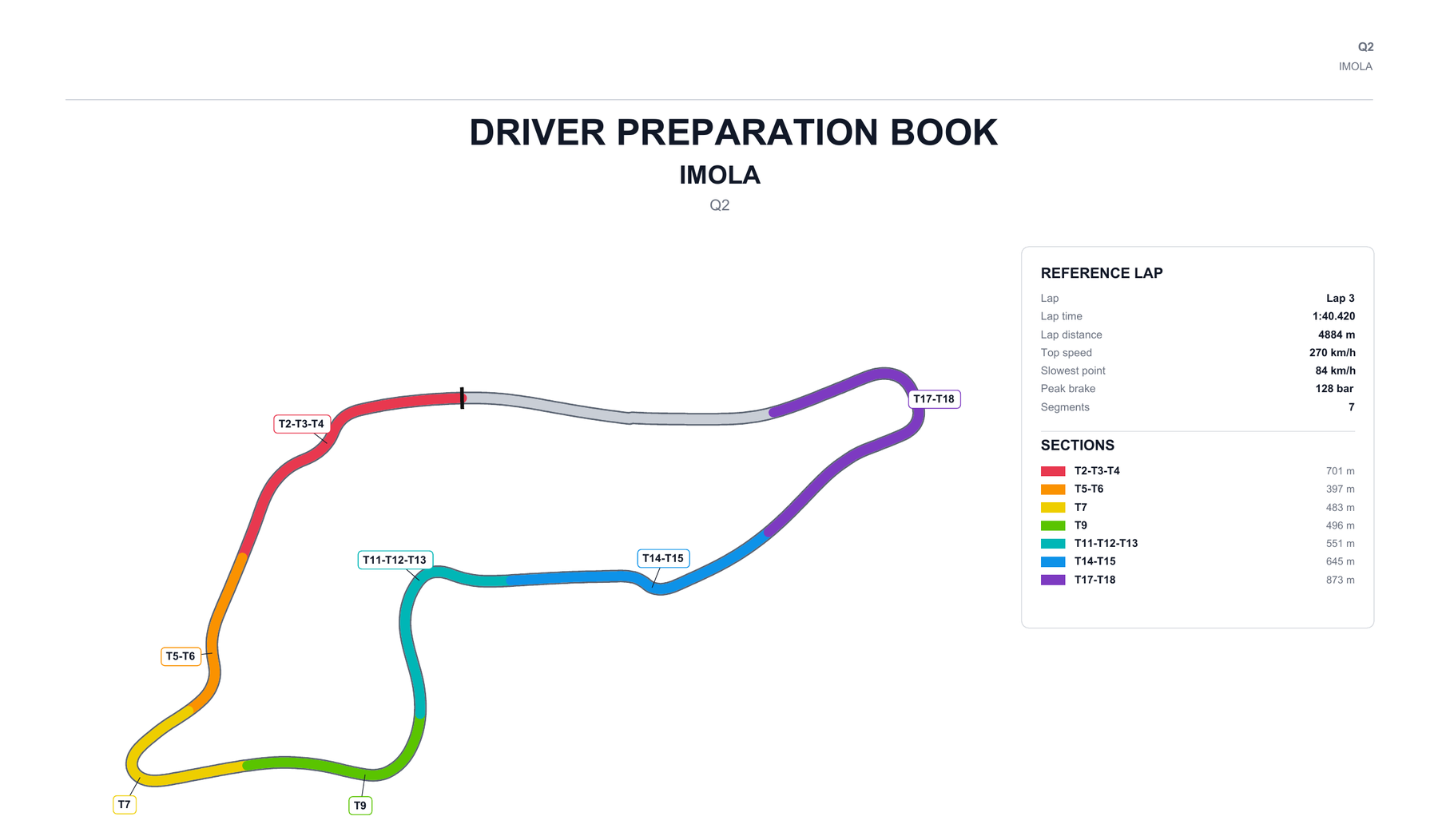
Opening report spread showing the summary page and full-lap comparison pages.
FIG. A.1 — SUMMARY AND FULL-LAP PAGES
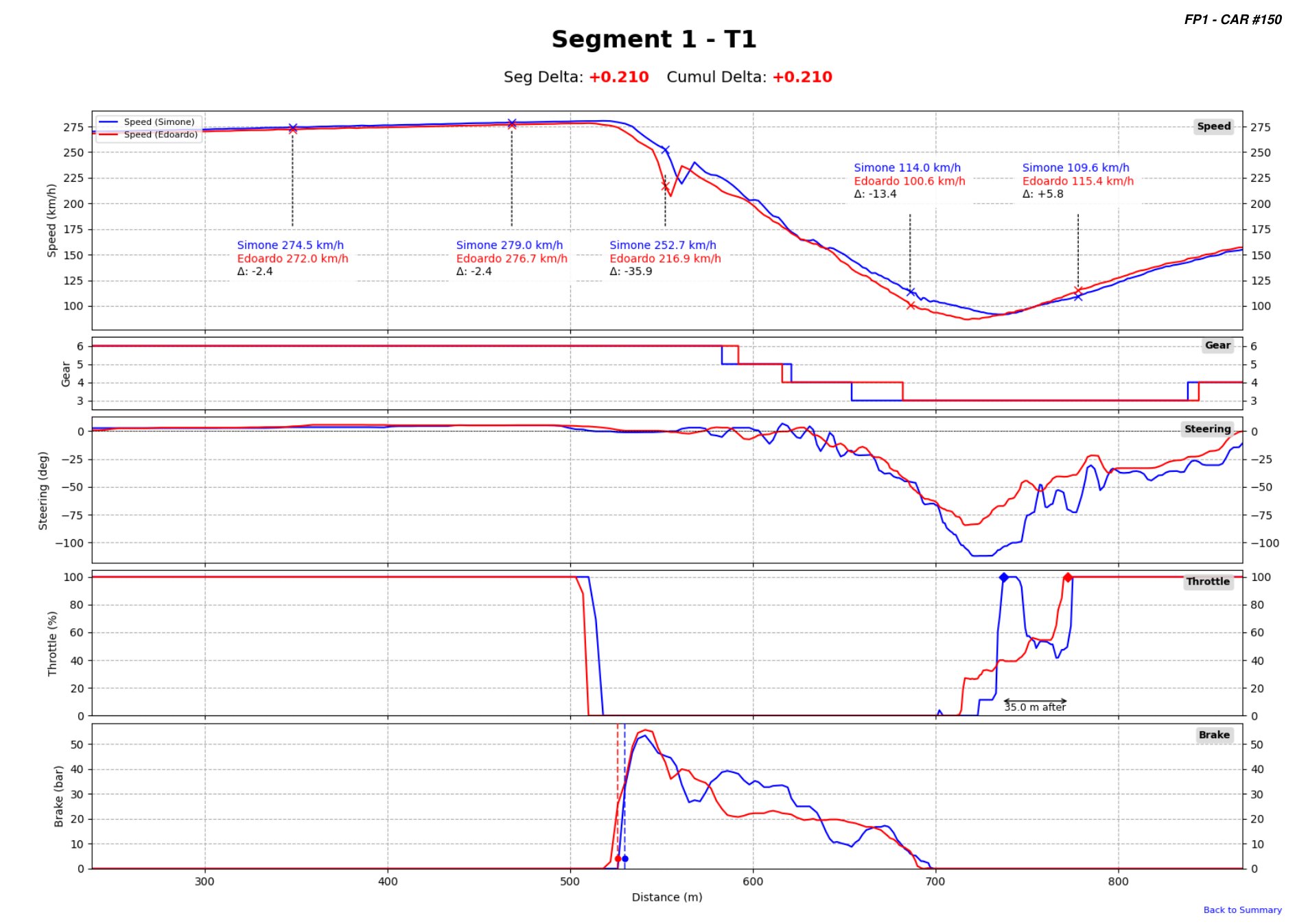
Telemetry page for Segment 3 T4-T5 with speed, gear, steering, throttle, and brake traces.
1
2
FIG. A.2 — SEGMENT TELEMETRY
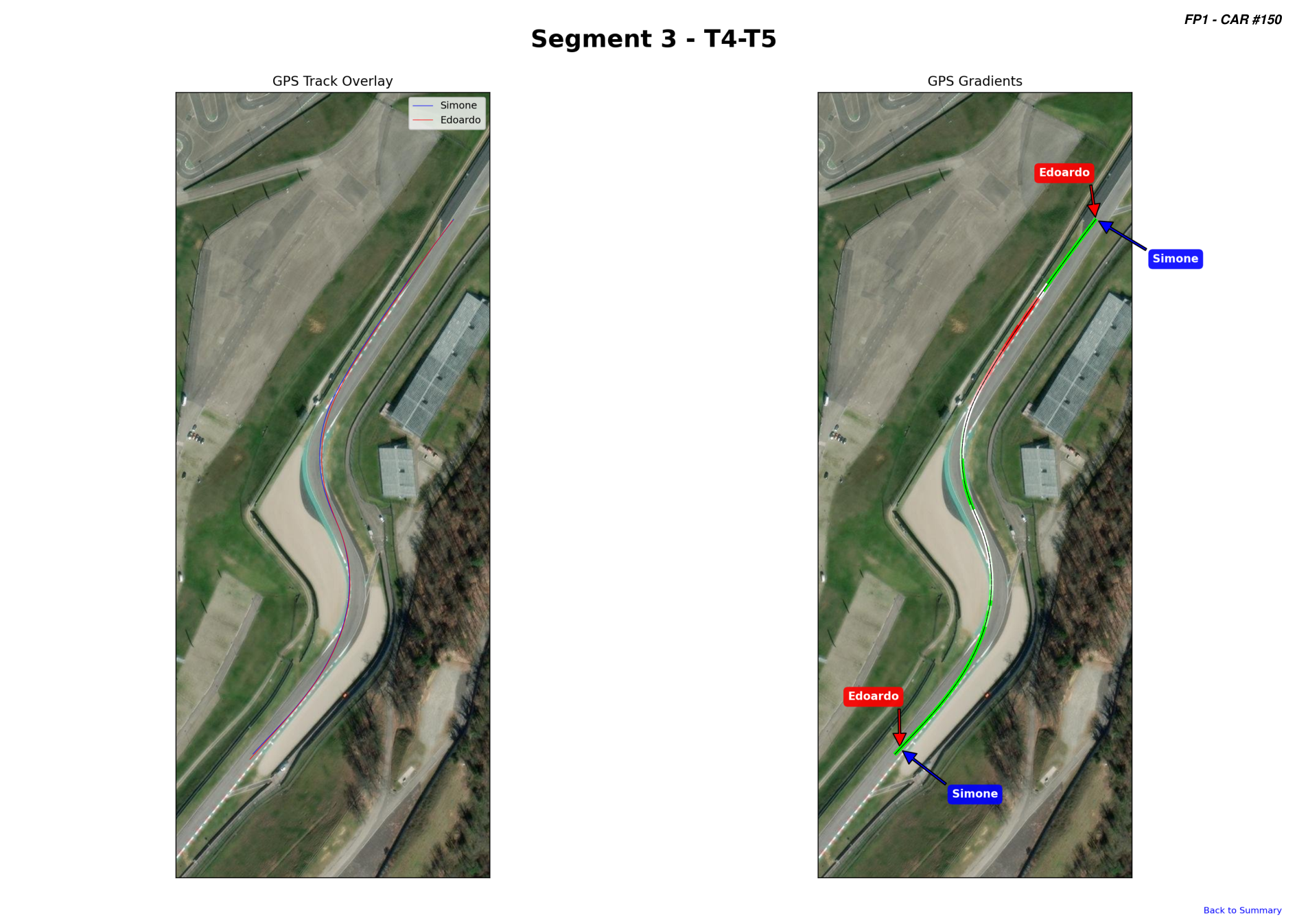
GPS page for Segment 3 T4-T5 with track overlay and gradient comparison.
1
2
FIG. A.3 — GPS OVERLAY

A.1 — OVERVIEW

Summary
The opening page gives the segment delta table and track overview, so the debrief starts with where the time is lost.
Full Lap
The next page moves to full-lap speed and delta traces to show how the gap builds across the distance.
Debrief Flow
The engineer can scan the full lap analysis first, then open one segment via the hyperlinks quickly, without reformatting the view.

A.2 — TELEMETRY

01 / Speed & Delta
The top trace shows the raw speed difference through the corner while the segment delta stays visible above it.
02 / Driver Inputs
Driver inputs are correctly aligned by GPS or distance for each segment, so the cause of the time loss is visible immediately.
03 / Segment Focus
Each segment page isolates one braking zone or corner instead of forcing the engineer to read the whole lap at once.

A.3 — GPS

01 / Track Overlay
The left view shows both lines together, so entry, apex, and exit placement can be discussed visually.
02 / Gradient View
The right view highlights the throttle and brake inputs compared to track reference points.
03 / GPS Context
After the telemetry page shows the input difference, the GPS page shows where that difference happened on the circuit.
SECTION BTHE WORKFLOW

Simple workflow. Fast reports.

Request trial access, log in to the reports workspace, or download the Windows or Apple silicon Mac app. Build driver comparison reports from compatible CSV files with GPS traces, VBOX files, and AiM data. The listed CSV vehicles are tested examples, not a hard support limit.

Reports web app sign-in screen for MSS Analysis.
1
FIG. B.1 — SIGN-IN
01 / Private Login
Users can access the reports workspace without email-based login, keeping report access separate from personal inboxes.
02 / Team Accounts
One account manager can provision users, manage access, and keep the team workflow under a single controlled setup.
03 / Limits And Access
Managers can set report limits, enabled workflows, and access levels for each account.
SECTION CDATA SOURCES

One report workflow across CSV, AiM, and VBOX sources.

MSS Analysis keeps the PDF workflow consistent across compatible CSV files, AiM imports, and VBOX files. CSV support requires GPS traces and the required channel mapping; the vehicle names below are tested examples, not the limit of support.

Data Sources And Tested CSV Examples
CSV Source
Tested CSV Examples
AiM
VBOX
CSV support is generic when GPS traces and required channels are available. The named vehicles are tested examples; VBOX and AiM remain supported source workflows.
SECTION DCUSTOMIZATION

Make the report match how your team works.

The standard PDF gives the driver comparison structure. Trial and paid setups can add custom branding, different page order, custom sections, series-specific labels, and team-specific analysis outputs.

Branding Add team logos, driver branding, sponsor marks, colour treatment, and headers that match the way the team presents debrief material.
Report structure Change page order, hide sections that are not useful, add recurring notes, and adapt the PDF to coach, engineer, or driver-facing workflows.
Analysis content Add requested traces, segment views, labels, comparisons, and ideal-lap outputs when the team needs a specific reporting logic.
SECTION ETRIAL REQUEST

Tell us what you need.

Trial access is reviewed manually so the account, data source, vehicle workflow, and PDF options match your request.

FORM LAL-26/E — TRIAL REQUEST

Vehicle / workflow

Write the data source, car, series, logger setup, or workflow you want to support.

Data source

Pick the known source types and add anything else we should know.

PDF options

Select the report changes you already know you need.

Verification